
Stop Flying Blind: A Practical Event Validation Pipeline That Surfaces Real Issues

We kept bumping into the same issue: our tracking docs said one thing, production data said another. Debug tools helped during rollout, but a month later silent breakages crept in.
This phenomenon is called tracking drift. It happens when the gradual degradation of data quality is caused by the natural evolution of the product’s codebase.
Key mechanisms of this process:
- Front-end Evolution: As developers update the UI, modify CSS classes, or change element IDs, existing triggers in your Tag Manager (GTM) lose their "hooks," causing specific events to stop firing.
- Structural Drift: Changes in the site's DOM (Document Object Model) or navigation flow often break data layer pushes, leading to missing parameters or broken conversion funnels.
- Maintenance Gap: Without a rigorous tracking-governance process, the "drift" accumulates over time, resulting in a significant gap between the data seen in GA4 and the actual user behavior recorded in your backend.
The core issue is not “bad tracking” — it is delayed awareness. Tracking drift rarely happens at release time. It happens later. By the time someone notices a dashboard anomaly, the data gap is already weeks old.
To deal with tracking drift, we’ve decided to create an automatic verification system to catch early, low-noise signals.
In this post we’ll focus on the architecture (not code) and share why this simple setup surfaces real problems fast.
The problem we wanted to solve
To address this issue, we decided to create a solution that would operate efficiently in a changing architecture, be transparent, allow for easy scalability, and offer real-time reporting.
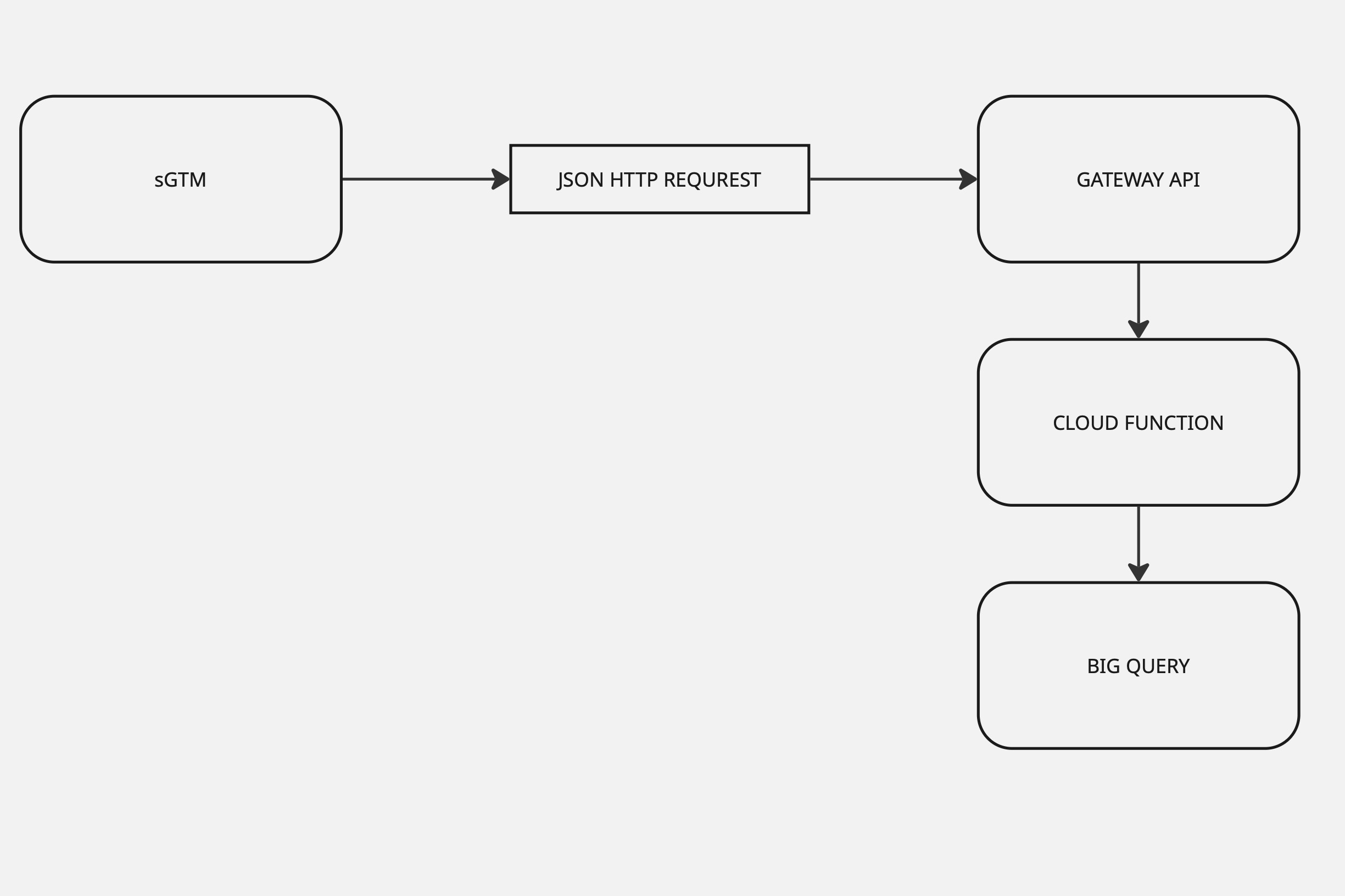
Our solution is based on a cloud-native validation loop with server-side GTM with open source JSON HTTP request Tag, Google Cloud’s Gateway Api for security, one Cloud Function, and a single BigQuery table. It flags missing fields, wrong types, and odd values in near real time.
How the pipeline works (and why it stays simple)
Events start in the browser or app, but instead of being sent straight to analytics tools, they first pass through our own server-side GTM endpoint. This gives us a controlled checkpoint where we can inspect and standardize what’s being sent before it becomes analytics data.
From there, every sampled event flows through a single, well-defined Gateway API entry point and into the Cloud Function, whose only job is to validate the payload and record the outcome.
The results are written immediately to BigQuery. There is no queue, no retry logic, and no attempt to “fix” or delay events. This pipeline never interferes with tracking. It doesn’t enforce — it observes.
Key behaviors:
Sampling happens early (typically 1–10%), keeping costs predictable while still surfacing issues quickly.
PII is stripped at the edge in sGTM — sensitive fields never leave the boundary.
Each validation issue becomes its own row in BigQuery; fully valid events still write a single “all good” row.
What “near real time” means here
There’s no buffering layer in this system.
A sampled event flows from sGTM to the Cloud Function and into BigQuery immediately. For this use case, that’s more than enough. We’re not building a transactional system — we’re building visibility.
Because the pipeline never blocks upstream tracking, it’s safe to run continuously in production.
Sampling & payload shaping
Sampling is applied as early as possible, directly in sGTM. In practice we sample roughly 1–10% of events — enough to detect schema drift quickly without inflating BigQuery scan costs. Each request carries a single event, which keeps payloads small and makes individual failures easy to inspect. Depending on the use case, we forward either the full event payload (after PII scrubbing) or a curated subset of critical fields, both configurable directly in the sGTM template.
Security (simple but sane)
- Access path: sGTM calls one URL on API Gateway and includes an API key in the request (we prefer a header, e.g.,
x-api-key, but a query param works if needed). - Gateway policy: only requests with a valid API key are routed to our Cloud Function.
- Permissions: the Cloud Function’s service account can write to the specific BigQuery dataset/table (least privilege).
- Read-only schemas (optional): if you store schemas in Cloud Storage, grant the function read-only access to that bucket.
- Regionality: keep the Gateway, Function, BigQuery, and (optionally) the schema bucket in one region to avoid cross-region costs and surprise latencies.
- PII: removed in sGTM — sensitive fields never leave the boundary.
Validation rules we actually use in Cloud Function
Each validation rule produces a single, self-contained finding: which field was checked, what kind of error occurred, what the rule expected, and what value actually arrived from production.
Missing checks ensure required fields are present.
Type checks verify primitives like strings vs. numbers.
Regex checks enforce formats such as ISO currency codes or ID shapes e.g. currency ^[A-Z]{3}$.
Value checks — business-critical value must be present and comply requirements
Example event schema used for validation
Before running the validation process, every event is expected to comply with a base schema.
Each property can define a type, a fixed expected value, or a regex constraint. That’s enough to catch the majority of real-world breakages we see.
Below is a simplified version that illustrates the type, value, and pattern constraints checked by the validator:
{
  "event_name":        { "type": "string", "value": "view_item_list" },
  "detail":            { "type": "string", "value": "product list viewed" },
  "event_id":          { "type": "string" },
  "primary_category":  { "type": "string", "value": "ecommerce" },
  "tags":              { "type": "string" },
  "currency":          { "type": "string", "regex": "^[A-Z]{3}$" },
  "value":             { "type": "number" },
}
Optional: Externalized schemas in Cloud Storage
We keep the validator inside the Cloud Function, but the rules can live as data. For teams with multiple event types, we store per-event schemas in a Cloud Storage bucket and load them at runtime based on event_name (or another key).
This turns validation rules into data:
- updates don’t require redeploying code,
- schemas can be versioned and rolled back,
- analytics teams can propose changes via pull requests.
If you want to keep things ultra-simple, hardcoding a small ruleset works perfectly fine. You can always externalize later.
Why one table?
Simplicity. Everything lands in one partitioned table. Instead of juggling “raw” vs. “invalid” tables, we store one row per validation finding with enough context to analyze patterns. This keeps queries and dashboards straightforward and makes it easy to compare valid vs. invalid over time.
Our data model (row-per-finding):
event_id— generated in the Cloud Function (stable ID for the event).field— the parameter/key we validated (e.g.,currency,value,user_id).error_type— the category of failure (we mainly use type and regex).expected— what the rule expected (e.g.,"number", or a pattern).actual— the value we observed (orNULLif missing).timestamp— time of entry into the Cloud Function (also our partition key).status—validorinvalid.event_name— GA-style name (or any custom event name).event_data— the event snapshot after PII scrubbing (stored as a stringified JSON).value— optional helper field for business-critical values when quick filtering is handy.
Table options we use:
Partition by: timestamp (daily) and Cluster by: event_name, status, error_type, field
Multiple errors in one event?
Yes — you’ll see multiple rows with the same event_id if an event violates more than one rule.
Fully valid event?
We still write one row with status='valid'. (Optionally, you can extend this to log per-field valids, but we keep it lean.)
Extending beyond GA
We started with GA-style events, but the pipeline is format-agnostic. If it’s JSON, we can validate it with the same approach and keep it in the same table structure. Add new event sources without re-architecting.
What the validator actually surfaced : Case Study
Once the pipeline was running, the value became obvious very quickly.
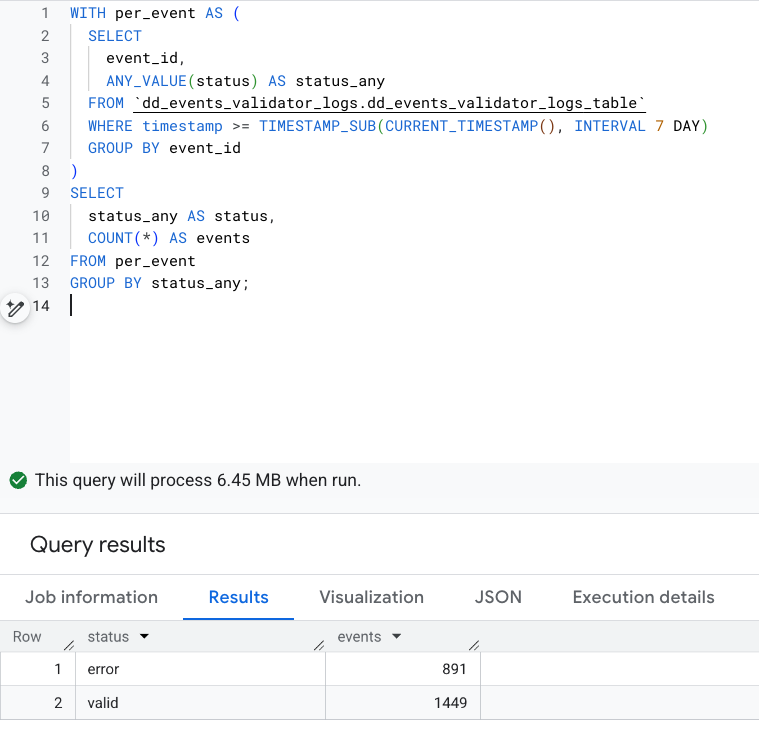
Looking at seven days of sampled production data, we saw roughly 2,300 distinct events. About 38% of them contained at least one validation error.
2) Which events break most
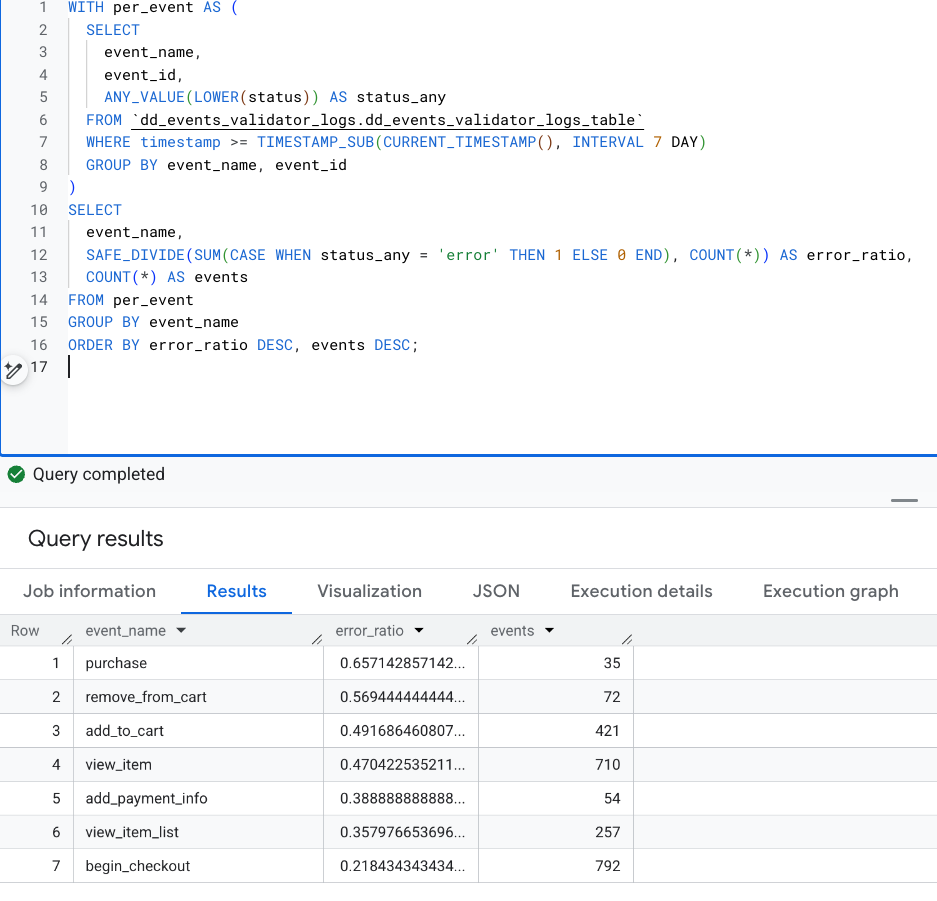
Certain events stood out immediately. purchase, add_to_cart, and remove_from_cart had the highest error ratios — not because they fired the most, but because they drifted the most.
3) What fails inside those events
Drilling deeper showed consistent patterns:
- fields that were present but carried the wrong semantic value,
- strings logged as empty instead of omitted,
- arrays missing entirely in specific flows.
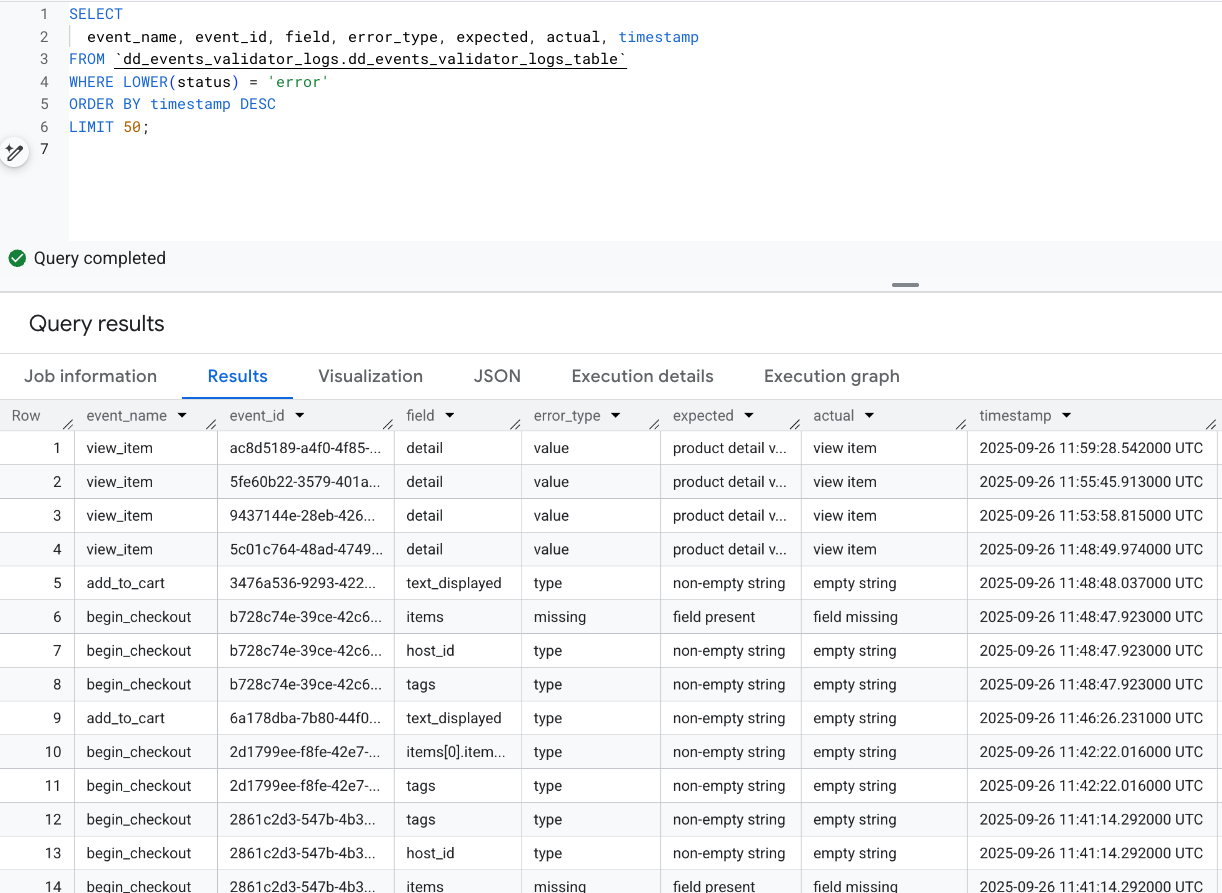
For example, one view_item event consistently populated the detail field — but with a label that no longer matched the agreed contract. Another case showed add_to_cart events sending empty UI labels where non-empty strings were expected. In checkout flows, line items were sometimes missing altogether.
None of these issues caused tracking to fail outright. But all of them quietly degraded data quality.
Without this validator, we would have found them much later — if at all.
Aggregated view of validation errors by event and field:
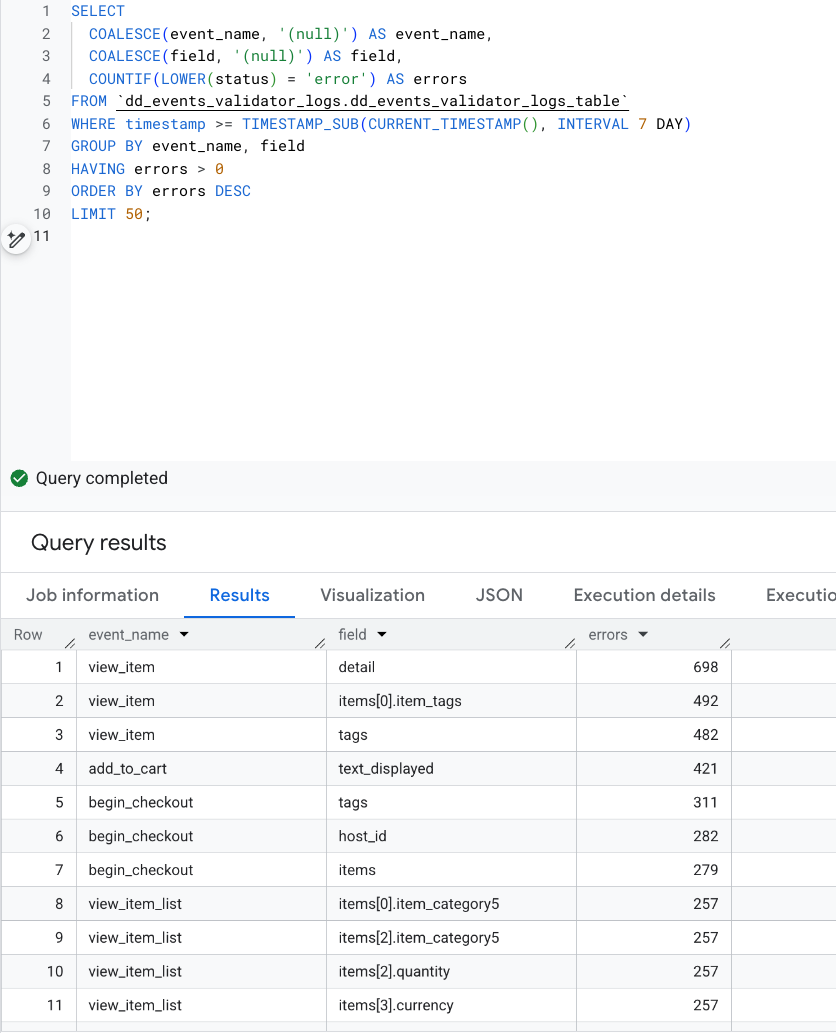
Latest validation errors with expected vs. actual values
Quick Architecture Recap
To recreate such a system, you need to prepare a few things:
- server-side GTM with JSON HTTP REQUEST Template
- one API Gateway endpoint with an API key,
- one HTTP Cloud Function,
- one partitioned BigQuery table.
That’s the entire system.
A dashboard on top is optional — useful, but not required. Even simple queries surface problems fast.
Want this without the build time?
This system is simple, but not simplistic. However, we realize that building this can be time-consuming.
If you want this delivered end-to-end (sGTM template, API Gateway, Cloud Function, BigQuery table, and a starter dashboard), Defused Data can implement it for you and tailor the validators to your event contract.
It's worth the effort because you get a solution that's affordable, easily scalable, and transparent to expand and use for everyone involved - from a developer who will develop solutions to an analyst who will use the data to build clear reports to a product owner who is responsible for the quality of tracking.

What’s new at Defused Data
Embrace a future filled with innovation, technology, and creativity by diving into our newest blog posts!
View all

Ready to start defusing?
We thrive on our customers' successes. Let us help you succeed in a truly data-driven way.