

By Adam Piatek, Consulting Services Lead at Defused Data
In e-commerce, the rule is simple: you sell best when you know exactly what the customer is looking for. Your internal site search is the only place where the user tells you directly what they expect. Ignoring this is simply a very bad idea.
You likely already use the basic GA4 search phrases report. Unfortunately, this standard view shows only part of the useful data. In GA4, you won't easily find out what was purchased, what phrase led to it, and how long it took your customer to make a purchasing decision. Without a crucial link between interaction with the search input box and purchase, GA4 data is just another report that doesn't say much, and optimization becomes guesswork.
In this post, we'll show you how to move from a basic "phrases report" to a blueprint of purchasing intent that finally answers the key question: "Show me the money!"
Scenario A: The Conversion Blueprint (High Intent)
Imagine a user correctly searches for "Sony noise-cancelling headphones". The report links this query to a purchase that occurred just 8 minutes later, attributing the $349 in revenue to that search.
Insight? This search phrase is a high-intent conversion blueprint. The user knew exactly what they wanted and the short time-to-purchase confirms high readiness. This metric should inform immediate bidding increases in paid search and site merchandising.
Scenario B: Measuring Frustration (High Friction)
A user correctly searches for "organic hand cream". Despite the accurate query, the purchase occurs 55 minutes later, or worse, never occurs at all (if the search is not followed by a transaction).
Insight? When a high-intent query results in a long delay or abandonment, it signals systemic friction. Was the product out of stock? Were the filtering options poor? This points to a critical flaw in search result ranking or inventory management.
Scenario C: The traffic sources chain
The marketing team wants to evaluate a new CPC campaign. They need to know: Did the search that preceded the sale originate from the initial campaign click, or did the user return later via organic search?
Insight? By linking the original campaign source of the user's session with their subsequent search and purchase, the report provides a traffic source chain. This allows you to evaluate campaigns not just by clicks and budget, but by the value of the specific, converting search phrases they generate.
Who Benefits Most from the Report?
Our report is a goldmine of knowledge, providing concrete, executable commands for key roles:
For Product Teams: Building a Better Search Engine
- Fine-tuning: See which typos and abbreviations lead to sales. Adjust synonyms and autocomplete so that even "shappoo" guides the user straight to the cart.
- Friction Elimination: Identify phrases followed by a purchase delay of over 30 minutes. This may mean that the user found the product but had a problem with e.g. its description, or the product does not match his search intent.
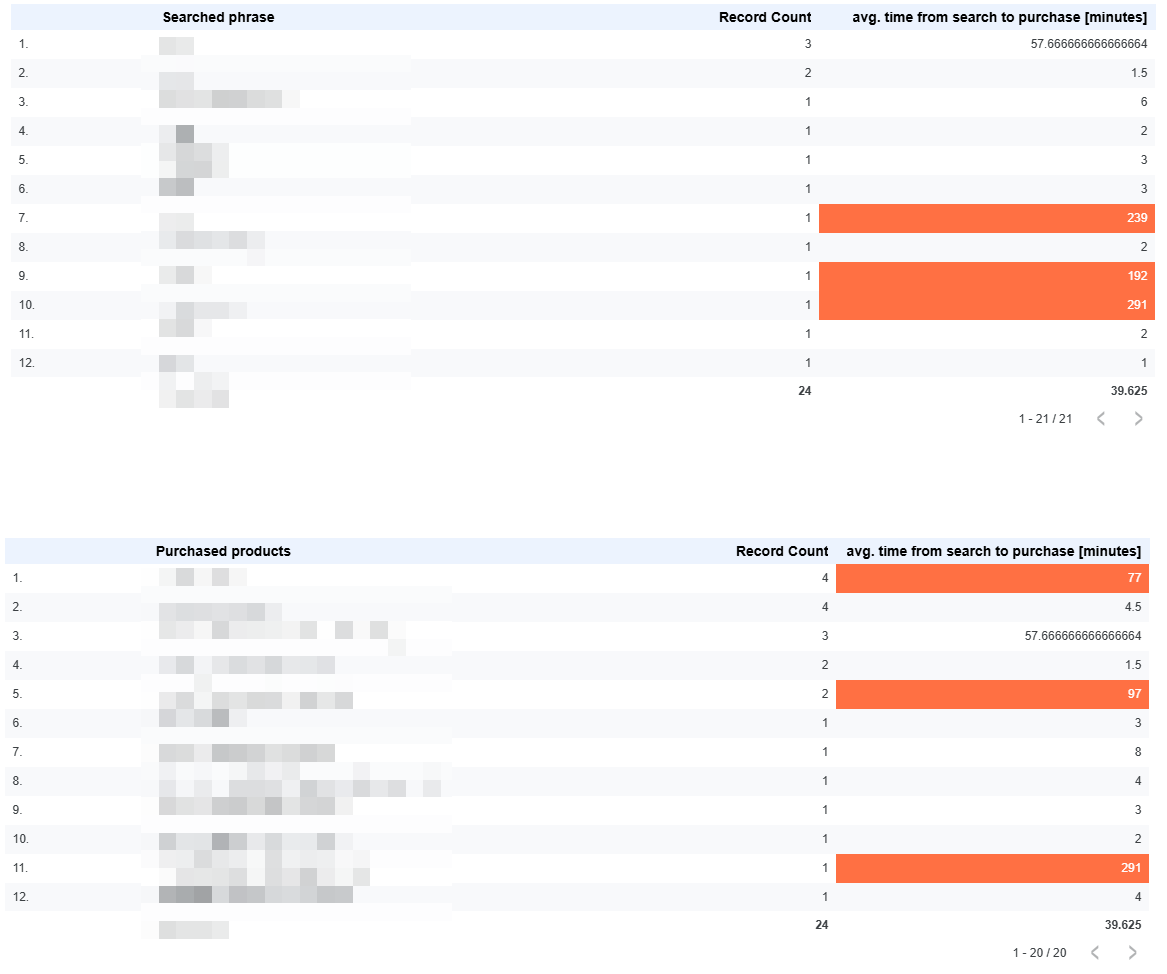
- With just a few clicks in Data Studio, you can build a summary based on the data returned by our query.
- In the tables below, you can see which products and phrases generate the most friction. In this case, searched phrases and products with a time to purchase longer than 60 minutes have been highlighted.
For Marketing Teams: Intent-Based Attribution
- Phrase Value: Link specific search phrases to the transaction value. This allows you to prioritize keywords in SEO and CPC based on proven, realized revenue.
- Campaign Quality: Instead of measuring campaigns only by clicks and budget, measure them by the quality of searches generated. Which source or campaign brings in users who enter phrases with the highest conversion rate and the shortest time-to-purchase?
Let's dive into the example report you can create with our SQL query.
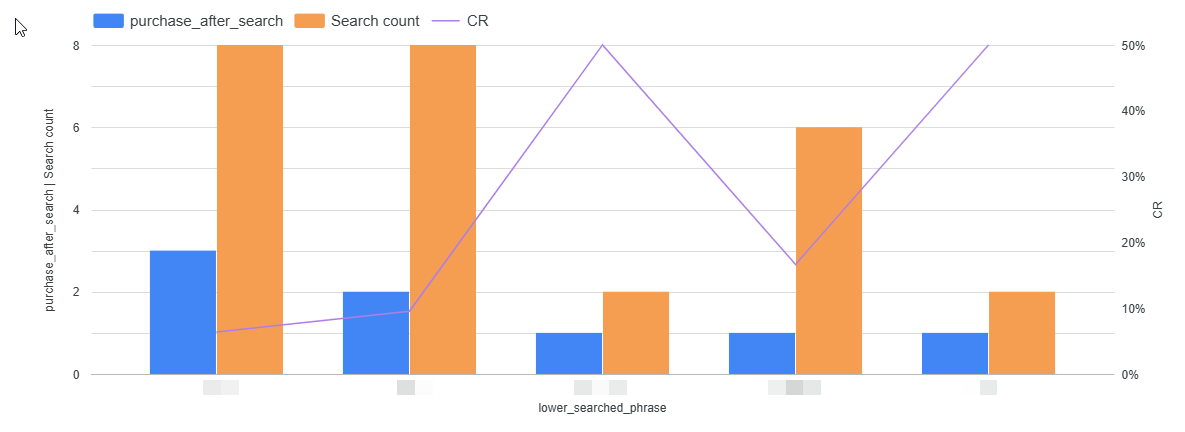
The X-axis shows searched terms.
The left-hand Y-axis shows the number of purchases after the search, and the number of searches for the given phrase.
The right-hand Y-axis shows the conversion rate from all searches to purchases.
Similar setup, but on the X-axis, you'll find campaigns that led to searches and purchases
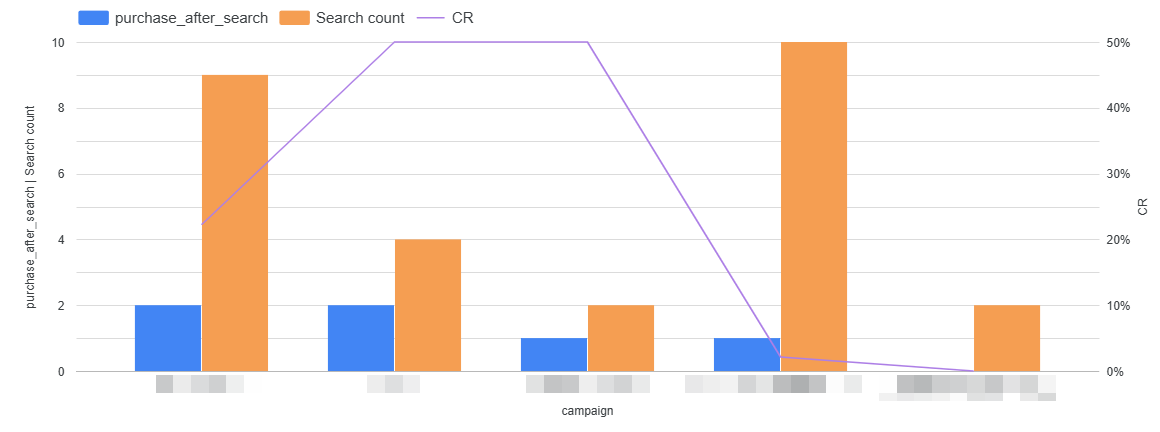
As you can see, visualizing search query and campaign performance is very easy. Just apply a few filters and you'll get exactly the results you need.
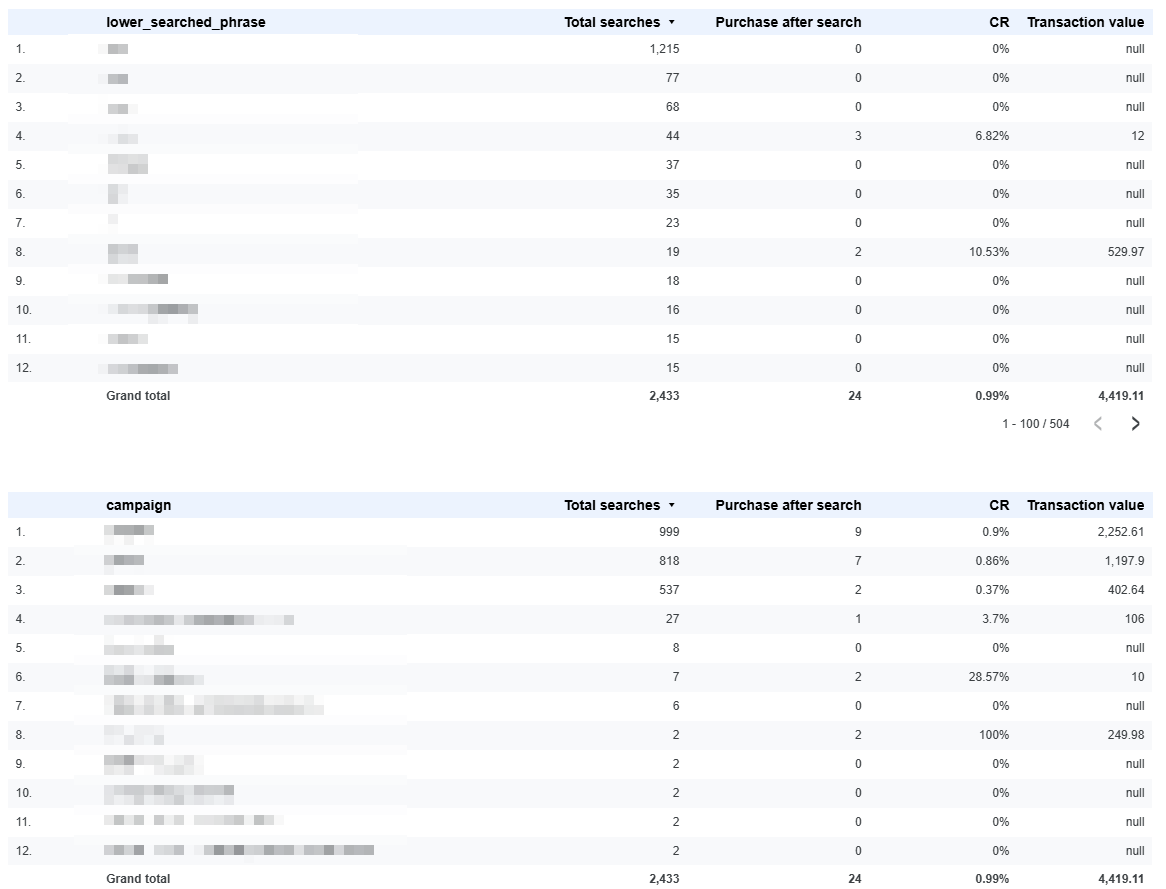
Marketing effectiveness is all about revenue. You can create a table with sales value, campaign name, search phrase, and even conversion rate per transaction after the search.
The Code
Below you'll find the code, divided into sections that are described so you know what's going on and can modify it to suit your needs. You can change the purchase event to 'add_to_cart', you can adjust the date range, you can add more parameters – it's all up to you. Have fun!
1. Date range declaration
Here, we define flexible date boundaries for the query. Instead of hardcoding table suffixes every time (a guaranteed way to slowly lose your sanity), we declare two parameters: date_start and date_end. This makes the query reusable across different date ranges - just change the values once at the top.
DECLARE date_start DATE;
DECLARE date_end DATE;
SET date_start = '2025-08-09';
SET date_end   = '2025-09-09';
2. transactions
This temporary table selects all purchase events within the specified date range and extracts all necessary attributes, including transaction value and product list.
WITH
  transactions AS (
    SELECT
      user_pseudo_id,
      event_timestamp AS transaction_timestamp,
      COALESCE(session_traffic_source_last_click.manual_campaign.campaign_name, (SELECT value.string_value FROM UNNEST(event_params) WHERE key = 'campaign'), '(direct)') AS campaign_name,
      COALESCE(session_traffic_source_last_click.manual_campaign.source, (SELECT value.string_value FROM UNNEST(event_params) WHERE key = 'source'), '(direct)') AS source_name,
      COALESCE(session_traffic_source_last_click.manual_campaign.medium, (SELECT value.string_value FROM UNNEST(event_params) WHERE key = 'medium'), '(none)') AS medium_name,
      (SELECT value.string_value FROM UNNEST(event_params) WHERE key = 'transaction_id') AS transaction_id,
      COALESCE(
        (SELECT value.int_value FROM UNNEST(event_params) WHERE key = 'value'),
        (SELECT value.float_value FROM UNNEST(event_params) WHERE key = 'value'),
        (SELECT value.double_value FROM UNNEST(event_params) WHERE key = 'value')
      ) AS transaction_value,
      ARRAY(SELECT item_name FROM UNNEST(items)) AS purchased_products
    FROM `your-project-id.analytics_123456789.events_*`
    WHERE event_name = 'purchase'
      AND _TABLE_SUFFIX BETWEEN FORMAT_DATE('%Y%m%d', date_start) AND FORMAT_DATE('%Y%m%d', date_end)
      AND (SELECT value.string_value FROM UNNEST(event_params) WHERE key = 'transaction_id') IS NOT NULL,
      AND user_pseudo_id IS NOT NULL
),Description:
COALESCE(...) AS campaign_name: Retrieves traffic attribution data. It prioritizes the nestedsession_traffic_source_last_click.manual_campaign. campaign_namecolumn, falls back to the event parameter campaign, and finally defaults to (direct) if both are missing. This is repeated forsource_nameandmedium_name.COALESCE((SELECT value.int_value...): Safely extracts the transactionvalueparameter, checking multiple possible data types (int_value,float_value,double_value) just in case :).ARRAY(SELECT item_name FROM UNNEST(items)): Aggregates the list of purchased product names from the nesteditemsarray into a single array column (purchased_products)._TABLE_SUFFIX BETWEEN ...: Filters the partitioned GA4 table using the defineddate_startanddate_endvariables, formatted asYYYYMMDDstrings.
3. searches
This temporary table extracts all search events, ensuring they contain a valid search term. We also convert any uppercase letters to lowercase - after all, GA4 data is quite sensitive, particularly when it comes to case sensitivity :)
  searches AS (
    SELECT
      user_pseudo_id,
      event_timestamp AS search_timestamp,
      COALESCE(session_traffic_source_last_click.manual_campaign.campaign_name, (SELECT value.string_value FROM UNNEST(event_params) WHERE key = 'campaign'), '(direct)') AS campaign_name,
      COALESCE(session_traffic_source_last_click.manual_campaign.source, (SELECT value.string_value FROM UNNEST(event_params) WHERE key = 'source'), '(direct)') AS source_name,
      COALESCE(session_traffic_source_last_click.manual_campaign.medium, (SELECT value.string_value FROM UNNEST(event_params) WHERE key = 'medium'), '(none)') AS medium_name,
      (SELECT value.string_value FROM UNNEST(event_params) WHERE key = 'search_term') as org_search_term,
      LOWER((SELECT value.string_value FROM UNNEST(event_params) WHERE key = 'search_term')) as lower_search_term
    FROM `your-project-id.analytics_123456789.events_*`
    WHERE event_name = 'search'
      AND _TABLE_SUFFIX BETWEEN FORMAT_DATE('%Y%m%d', date_start) AND FORMAT_DATE('%Y%m%d', date_end)
      AND (SELECT value.string_value FROM UNNEST(event_params) WHERE key = 'search_term') IS NOT NULL,
      AND user_pseudo_id IS NOT NULL
),Description:
event_name = 'search': Filters the data to include only search events.org_search_term/lower_search_term: Extracts the original search term and creates a lowercase version using theLOWER()function for standardized analysis.... IS NOT NULL: Crucially ensures that only searches with an actual query are included.
4. searches_with_transactions
This is the core joining step that links every search to all subsequent purchases made by the same user.
  searches_with_transactions AS (
    SELECT
      s.user_pseudo_id,
      s.org_search_term,
      s.lower_search_term,
      s.search_timestamp,
      s.campaign_name,
      s.source_name,
      s.medium_name,
      t.transaction_id,
      t.transaction_timestamp,
      t.transaction_value,
      t.purchased_products,
      ROW_NUMBER() OVER(
        PARTITION BY s.user_pseudo_id, s.search_timestamp
        ORDER BY t.transaction_timestamp ASC
      ) AS rn
    FROM searches s
    LEFT JOIN transactions t
      ON s.user_pseudo_id = t.user_pseudo_id
      AND s.search_timestamp < t.transaction_timestamp
),Description:
LEFT JOIN ... ON s.user_pseudo_id = t.user_pseudo_id: Joins searches (s) and transactions (t) based on the user ID.AND s.search_timestamp < t.transaction_timestamp: Time-based joining condition. It ensures a search is only linked to transactions that occurred chronologically after the search.ROW_NUMBER() OVER(...) AS rn: Assigns a sequential number to transactions that follow a specific search. This is preparatory for the next step, where we'll isolate the very next transaction.
5. searches_with_next_transaction
This table filters the results from the previous step to isolate the nearest subsequent transaction for each search event.
  searches_with_next_transaction AS (
    SELECT * EXCEPT(rn)
    FROM searches_with_transactions
    WHERE rn = 1 OR rn IS NULL
),Description:
WHERE rn = 1: Selects only the first transaction (rn = 1) that occurred immediately after a search event. This links a search to the single, most relevant future purchase.OR rn IS NULL: Preserves all search events that were not followed by any transaction within the specified date range.* EXCEPT(rn): Drops the temporary row number column.
6. last_search_per_transaction
This is an attribution step: it identifies the final search term a user used before completing a specific transaction.
last_search_per_transaction AS (
    SELECT
      transaction_id,
      FIRST_VALUE(org_search_term) OVER(
        PARTITION BY transaction_id
        ORDER BY search_timestamp DESC
        ROWS BETWEEN UNBOUNDED PRECEDING AND UNBOUNDED FOLLOWING
      ) AS last_org_search_term,
      FIRST_VALUE(lower_search_term) OVER(
        PARTITION BY transaction_id
        ORDER BY search_timestamp DESC
        ROWS BETWEEN UNBOUNDED PRECEDING AND UNBOUNDED FOLLOWING
      ) AS last_lower_search_term
    FROM searches_with_next_transaction
    WHERE transaction_id IS NOT NULL
    QUALIFY ROW_NUMBER() OVER(PARTITION BY transaction_id ORDER BY search_timestamp DESC) = 1
  ),
Description:
FIRST_VALUE(...) OVER(ORDER BY search_timestamp DESC): This function retrieves the value of the search term from the most recent row (due toDESCordering) within the window partitioned bytransaction_id.QUALIFY ROW_NUMBER() OVER(...) = 1: Ensures that only one row (representing the last search) is returned for each unique transaction ID, effectively de-duplicating the transaction data.
7. combined_events
This step merges the filtered search events and purchase events into a single, comprehensive timeline using a UNION ALL.
combined_events AS (
    SELECT
      user_pseudo_id,
      search_timestamp AS event_timestamp,
      'search' AS event_name,
      org_search_term,
      lower_search_term,
      campaign_name,
      source_name,
      medium_name,
      transaction_id,
      transaction_timestamp,
      transaction_value,
      purchased_products
    FROM searches_with_next_transaction

    UNION ALL

    SELECT
      t.user_pseudo_id,
      t.transaction_timestamp AS event_timestamp,
      'purchase' AS event_name,
      CASE WHEN ls.last_org_search_term = '' THEN NULL ELSE ls.last_org_search_term END AS org_search_term,
      CASE WHEN ls.last_lower_search_term = '' THEN NULL ELSE ls.last_lower_search_term END AS lower_search_term,
      t.campaign_name,
      t.source_name,
      t.medium_name,
      t.transaction_id,
      t.transaction_timestamp,
      t.transaction_value,
      t.purchased_products
    FROM transactions t
    LEFT JOIN last_search_per_transaction ls
      ON t.transaction_id = ls.transaction_id
  )
Description:
UNION ALL: Appends the purchase records to the search records, creating a unified dataset.- Data Alignment: For the
purchaseevents, the search term columns are populated with the last search term found in the previous CTE (ls).
8. Final SELECT
The final SELECT formats the data, calculates the requested metrics, and assigns the final chronological numbers.
SELECT
  DATE(TIMESTAMP_MICROS(ce.event_timestamp), 'Europe/Warsaw') AS event_date,
  ce.event_timestamp,
  ce.event_name,
  ce.transaction_id,
  ce.user_pseudo_id,
  ce.org_search_term AS org_searched_phrase,
  ce.lower_search_term AS lower_searched_phrase,
  ce.campaign_name AS campaign,
  ce.source_name AS source,
  ce.medium_name AS medium,

  CASE
    WHEN ce.event_name = 'search' AND ce.transaction_id IS NOT NULL THEN
      ROW_NUMBER() OVER(PARTITION BY ce.transaction_id, ce.event_name ORDER BY ce.event_timestamp)
    WHEN ce.event_name = 'search' AND ce.user_pseudo_id IS NOT NULL THEN
      ROW_NUMBER() OVER(PARTITION BY ce.user_pseudo_id, ce.event_name ORDER BY ce.event_timestamp)
    WHEN ce.event_name = 'search' THEN
      1
    ELSE
      NULL
  END AS search_number,

  CASE
    WHEN ce.event_name = 'search' AND ce.transaction_timestamp IS NOT NULL THEN
      DATETIME_DIFF(TIMESTAMP_MICROS(ce.transaction_timestamp), TIMESTAMP_MICROS(ce.event_timestamp), MINUTE)
    ELSE
      NULL
  END AS minutes_before_transaction,
  ce.transaction_value,
  ce.purchased_products,

  CASE
    WHEN ce.transaction_id IS NOT NULL
        AND ce.event_name = 'search'
        AND LEAD(ce.event_name) OVER(PARTITION BY ce.transaction_id ORDER BY ce.event_timestamp) = 'purchase'
    THEN 1
    ELSE 0
  END AS purchase_after_search
FROM combined_events ce
--WHERE ce.transaction_id IS NOT NULL  -- Only paths leading to a purchase
ORDER BY ce.transaction_id, ce.event_timestamp;
Description:
DATE(TIMESTAMP_MICROS(...)): Formats the event timestamp into a readable date.CASE WHEN ce.event_name = 'search' ... THEN ROW_NUMBER() OVER(...): Dynamically calculates thesearch_number(sequential count) for search events. It prioritizes partitioning bytransaction_id(for paths leading to purchase) and falls back touser_pseudo_id(for general search history).DATETIME_DIFF(...): Calculates the time difference in minutes between the search event and the linked purchase event.LEAD(ce.event_name) OVER(...): This window function looks at the next event in the sequence (partitioned by transaction ID) to determine if apurchase_after_searchoccurred immediately.ORDER BY ce.transaction_id, ce.event_timestamp: Ensures the final output displays the customer journey in chronological order for easy analysis.
You can just run this query on your GA4 data and check your e-commerce and internal search results. You can also test using different fields that report traffic sources, or even add the first source of user acquisition to a new column and calculate how users perform by first-touch campaign. There are many possibilities, we hope that this query will allow you to conduct many interesting analyses.
If you have any problems or questions, just contact us using links below. We have a lot more in store!
And now, the whole code in one block, so you can just copy and paste it. Don't forget to change the project ID and the table name!
DECLARE date_start DATE;
DECLARE date_end DATE;
SET date_start = '2025-09-09';
SET date_end   = '2025-10-09';

WITH
  transactions AS (
    SELECT
      user_pseudo_id,
      event_timestamp AS transaction_timestamp,
      COALESCE(session_traffic_source_last_click.manual_campaign.campaign_name, (SELECT value.string_value FROM UNNEST(event_params) WHERE key = 'campaign'), '(direct)') AS campaign_name,
      COALESCE(session_traffic_source_last_click.manual_campaign.source, (SELECT value.string_value FROM UNNEST(event_params) WHERE key = 'source'), '(direct)') AS source_name,
      COALESCE(session_traffic_source_last_click.manual_campaign.medium, (SELECT value.string_value FROM UNNEST(event_params) WHERE key = 'medium'), '(none)') AS medium_name,
      (SELECT value.string_value FROM UNNEST(event_params) WHERE key = 'transaction_id') AS transaction_id,
      COALESCE(
        (SELECT value.int_value FROM UNNEST(event_params) WHERE key = 'value'),
        (SELECT value.float_value FROM UNNEST(event_params) WHERE key = 'value'),
        (SELECT value.double_value FROM UNNEST(event_params) WHERE key = 'value')
      ) AS transaction_value,
      ARRAY(SELECT item_name FROM UNNEST(items)) AS purchased_products
    FROM `your-project-id.analytics_123456789.events_*`
    WHERE event_name = 'purchase'
      AND _TABLE_SUFFIX BETWEEN FORMAT_DATE('%Y%m%d', date_start) AND FORMAT_DATE('%Y%m%d', date_end)
      AND (SELECT value.string_value FROM UNNEST(event_params) WHERE key = 'transaction_id') IS NOT NULL
      AND user_pseudo_id IS NOT NULL

  ),


  searches AS (
    SELECT
      user_pseudo_id,
      event_timestamp AS search_timestamp,
      COALESCE(session_traffic_source_last_click.manual_campaign.campaign_name, (SELECT value.string_value FROM UNNEST(event_params) WHERE key = 'campaign'), '(direct)') AS campaign_name,
      COALESCE(session_traffic_source_last_click.manual_campaign.source, (SELECT value.string_value FROM UNNEST(event_params) WHERE key = 'source'), '(direct)') AS source_name,
      COALESCE(session_traffic_source_last_click.manual_campaign.medium, (SELECT value.string_value FROM UNNEST(event_params) WHERE key = 'medium'), '(none)') AS medium_name,
      (SELECT value.string_value FROM UNNEST(event_params) WHERE key = 'search_term') as org_search_term,
      LOWER((SELECT value.string_value FROM UNNEST(event_params) WHERE key = 'search_term')) as lower_search_term
    FROM `your-project-id.analytics_123456789.events_*`
    WHERE event_name = 'search'
      AND _TABLE_SUFFIX BETWEEN FORMAT_DATE('%Y%m%d', date_start) AND FORMAT_DATE('%Y%m%d', date_end)
      AND (SELECT value.string_value FROM UNNEST(event_params) WHERE key = 'search_term') IS NOT NULL
      AND user_pseudo_id IS NOT NULL
  ),


  searches_with_transactions AS (
    SELECT
      s.user_pseudo_id,
      s.org_search_term,
      s.lower_search_term,
      s.search_timestamp,
      s.campaign_name,
      s.source_name,
      s.medium_name,
      t.transaction_id,
      t.transaction_timestamp,
      t.transaction_value,
      t.purchased_products,
      ROW_NUMBER() OVER(
        PARTITION BY s.user_pseudo_id, s.search_timestamp
        ORDER BY t.transaction_timestamp ASC
      ) AS rn
    FROM searches s
    LEFT JOIN transactions t
      ON s.user_pseudo_id = t.user_pseudo_id
     AND s.search_timestamp < t.transaction_timestamp
  ),


  searches_with_next_transaction AS (
    SELECT * EXCEPT(rn)
    FROM searches_with_transactions
    WHERE rn = 1 OR rn IS NULL
  ),


  last_search_per_transaction AS (
    SELECT
      transaction_id,
      FIRST_VALUE(org_search_term) OVER(
        PARTITION BY transaction_id
        ORDER BY search_timestamp DESC
        ROWS BETWEEN UNBOUNDED PRECEDING AND UNBOUNDED FOLLOWING
      ) AS last_org_search_term,
      FIRST_VALUE(lower_search_term) OVER(
        PARTITION BY transaction_id
        ORDER BY search_timestamp DESC
        ROWS BETWEEN UNBOUNDED PRECEDING AND UNBOUNDED FOLLOWING
      ) AS last_lower_search_term
    FROM searches_with_next_transaction
    WHERE transaction_id IS NOT NULL
    QUALIFY ROW_NUMBER() OVER(PARTITION BY transaction_id ORDER BY search_timestamp DESC) = 1
  ),


  combined_events AS (

    SELECT
      user_pseudo_id,
      search_timestamp AS event_timestamp,
      'search' AS event_name,
      org_search_term,
      lower_search_term,
      campaign_name,
      source_name,
      medium_name,
      transaction_id,
      transaction_timestamp,
      transaction_value,
      purchased_products
    FROM searches_with_next_transaction

    UNION ALL


    SELECT
      t.user_pseudo_id,
      t.transaction_timestamp AS event_timestamp,
      'purchase' AS event_name,
      CASE WHEN ls.last_org_search_term = '' THEN NULL ELSE ls.last_org_search_term END AS org_search_term,
      CASE WHEN ls.last_lower_search_term = '' THEN NULL ELSE ls.last_lower_search_term END AS lower_search_term,
      t.campaign_name,
      t.source_name,
      t.medium_name,
      t.transaction_id,
      t.transaction_timestamp,
      t.transaction_value,
      t.purchased_products
    FROM transactions t
    LEFT JOIN last_search_per_transaction ls
      ON t.transaction_id = ls.transaction_id
  )


SELECT
  DATE(TIMESTAMP_MICROS(ce.event_timestamp), 'Europe/Warsaw') AS event_date,
  ce.event_timestamp,
  ce.event_name,
  ce.transaction_id,
  ce.user_pseudo_id,
  ce.org_search_term AS org_searched_phrase,
  ce.lower_search_term AS lower_searched_phrase,
  ce.campaign_name AS campaign,
  ce.source_name AS source,
  ce.medium_name AS medium,

  CASE
    WHEN ce.event_name = 'search' AND ce.transaction_id IS NOT NULL THEN
      ROW_NUMBER() OVER(PARTITION BY ce.transaction_id, ce.event_name ORDER BY ce.event_timestamp)
    WHEN ce.event_name = 'search' AND ce.user_pseudo_id IS NOT NULL THEN
      ROW_NUMBER() OVER(PARTITION BY ce.user_pseudo_id, ce.event_name ORDER BY ce.event_timestamp)
    WHEN ce.event_name = 'search' THEN
      1
    ELSE
      NULL
  END AS search_number,

  CASE
    WHEN ce.event_name = 'search' AND ce.transaction_timestamp IS NOT NULL THEN
      DATETIME_DIFF(TIMESTAMP_MICROS(ce.transaction_timestamp), TIMESTAMP_MICROS(ce.event_timestamp), MINUTE)
    ELSE
      NULL
  END AS minutes_before_transaction,
  ce.transaction_value,
  ce.purchased_products,

  CASE
    WHEN ce.transaction_id IS NOT NULL
         AND ce.event_name = 'search'
         AND LEAD(ce.event_name) OVER(PARTITION BY ce.transaction_id ORDER BY ce.event_timestamp) = 'purchase'
    THEN 1
    ELSE 0
  END AS purchase_after_search
FROM combined_events ce
--WHERE ce.transaction_id IS NOT NULL  -- Only paths leading to purchase
ORDER BY ce.transaction_id, ce.event_timestamp;

What’s new at Defused Data
Embrace a future filled with innovation, technology, and creativity by diving into our newest blog posts!
View all
Ready to start defusing?
We thrive on our customers' successes. Let us help you succeed in a truly data-driven way.