

By Patryk Marczak, Frontend Developer at Defused Data
Editor's Note:
Apache Kafka and similar technologies have been around in the backend and data realm for quite some time now and event streaming and message queues became a de facto standard. In our way of work, though, we rarely care about how they are connected to the frontend, don’t we? That’s why we asked Patryk, our sole frontend developer to share his thoughts on the implementation and how to speed it up.
- Maciek Stanasiuk, CEO & Principal Consultant at Defused Data
Using a cloud provider, such as GCP, gives access to many services out of the box, drastically speeding up the app development process. But how do we keep our client app synced with what’s going on behind the scenes? Fortunately Pub/Sub comes to the rescue (at least in with said GCP). It’s a messaging system that handles internal communication between different services on the platform. It is commonly used to build event-driven architectures, stream data between services, and process tasks in the background, helping applications remain scalable and loosely coupled. Our use case was slightly different, though - we needed a way to schedule a Cloud Build job while being able to monitor the state of it, returning the statuses directly on the frontend. Turns out there’s nothing preventing us from doing so!
How does it work?
Pub/Sub is built around three main components that work together to keep information flowing smoothly.
- Publishers,
- Subscribers,
- Topics.
Publishers are the parts of a system responsible for sending messages. They generate and publish information that needs to be shared with other components, without needing to know who will receive it or how it will be processed.
Subscribers are the components that receive and handle those messages. They listen for new incoming data and take action when a message arrives — for example, by processing, transforming, or storing it.
Topics act as communication channels that connect publishers and subscribers. Publishers send messages to a specific topic, and all subscribers attached to that topic receive those messages automatically.
.png)
How to implement it?
The good news is that it’s very easy to implement. The bad news is that due to security reasons, libraries provided by Google are available only for the backend environment. So, to actually have a frontend app that responds to Pub/Sub events, we need to create a server that intercepts messages and then notifies the client app. That notification system could be implemented in many ways, e.g., with WebSockets or a real-time database.
Using WebSockets gives us more control of the whole process and is definitely a better choice when there’s no need to save data, only to propagate it further. It does require additional effort to implement extra logic, though. That’s why in this article I’ll use Firebase Cloud Functions as a backend and Firestore as a real-time database. Doing that with Firebase or Cloud Run Functions takes the burden of authentication away from us, because the system already checks it against a specific service account.
import * as functions from 'firebase-functions';
import * as admin from 'firebase-admin';

admin.initializeApp();

// Firestore reference
const db = admin.firestore();

// Subscriber: triggered by Pub/Sub messages
export const handleMessageAndSave = functions.pubsub
  .topic('demo-topic')
  .onPublish(async (message) => {
    try {
      const data = message.json; // Parsed JSON payload
      functions.logger.info('Received message:', data);

      // Save the data to Firestore
      const docRef = db.collection('messages').doc(); // generates new doc id
      await docRef.set({
        ...data,
        pubsubMessageId: message.messageId,
        receivedAt: admin.firestore.FieldValue.serverTimestamp(),
      });

      functions.logger.info(`Message saved to Firestore with ID: ${docRef.id}`);
    } catch (err) {
      functions.logger.error('Error saving message to Firestore:', err);
    }
  });
The above example shows implementation for both a Publisher and a Subscriber. As we can see, both processes can be done with ease. It’s worth noting that when running them as Cloud Run Functions, a Subscriber is an ordinary function that must be deployed with a specific flag.
The problem
Do you already see the main problem with the presented approach? That’s right, it’s only backend-oriented! There’s no way to connect directly to a topic from a frontend application. The solution is to use a proxy server. And to have real-time updates, it’d require us to add a WebSocket functionality.
Although that approach is very rational, it brings the need to develop some additional logic. Or does it?
Just remember about the Firestore database, which supports listening to real-time updates. That allows us to skip the burden of writing our own implementation. How cool is that?
Below is an example of a Firebase Cloud Function that subscribes to a topic and adds another document to a Firestore collection every single time it receives a message:
import * as functions from 'firebase-functions';
import * as admin from 'firebase-admin';

admin.initializeApp();

// Firestore reference
const db = admin.firestore();

// Subscriber: triggered by Pub/Sub messages
export const handleMessageAndSave = functions.pubsub
  .topic('demo-topic')
  .onPublish(async (message) => {
    try {
      const data = message.json; // Parsed JSON payload
      functions.logger.info('Received message:', data);

      // Save the data to Firestore
      const docRef = db.collection('messages').doc(); // generates new doc id
      await docRef.set({
        ...data,
        pubsubMessageId: message.messageId,
        receivedAt: admin.firestore.FieldValue.serverTimestamp(),
      });

      functions.logger.info(`Message saved to Firestore with ID: ${docRef.id}`);
    } catch (err) {
      functions.logger.error('Error saving message to Firestore:', err);
    }
  });
Here is an example of a simple React hook that allows us to listen for new events in realtime. It also handles loading state and error messages.
import { useState, useEffect } from 'react';
import { collection, onSnapshot, query, orderBy } from 'firebase/firestore';
import { db } from './firebase'; // Your initialized Firestore instance

/**
 * Custom hook to subscribe to the 'messages' collection in Firestore.
 * Returns real-time updates whenever the collection changes.
 */
export const useMessages = () => {
  const [messages, setMessages] = useState([]);
  const [loading, setLoading] = useState(true);
  const [error, setError] = useState(null);

  useEffect(() => {
    // Create a query: messages ordered by receivedAt descending
    const q = query(
      collection(db, 'messages'),
      orderBy('receivedAt', 'desc')
    );

    // Subscribe to the collection
    const unsubscribe = onSnapshot(
      q,
      (snapshot) => {
        const msgs = snapshot.docs.map(doc => ({
          pubsubMessageId: doc.data().pubsubMessageId,
          receivedAt: doc.data().receivedAt,
          ...doc.data()
        }));
        setMessages(msgs);
        setLoading(false);
      },
      (err) => {
        console.error('Error fetching messages:', err);
        setError(err);
        setLoading(false);
      }
    );

    // Cleanup subscription on unmount
    return () => unsubscribe();
  }, []);

  return { messages, loading, error };
};
As an extra bonus, storing such events data in Firestore also allows us to use it for any analytics or activation purposes without any further development work, especially when we enable Firestore to BigQuery sync.
Summary
Pub/Sub is an excellent tool that allows us to communicate different services and transport data, especially within GCP. It’s very straightforward to implement, especially on the backend. Using Firestore as a proxy, though, we can make it communicate with the frontend even without a complex WebSocket setup. How cool is that?

What’s new at Defused Data
Embrace a future filled with innovation, technology, and creativity by diving into our newest blog posts!
View all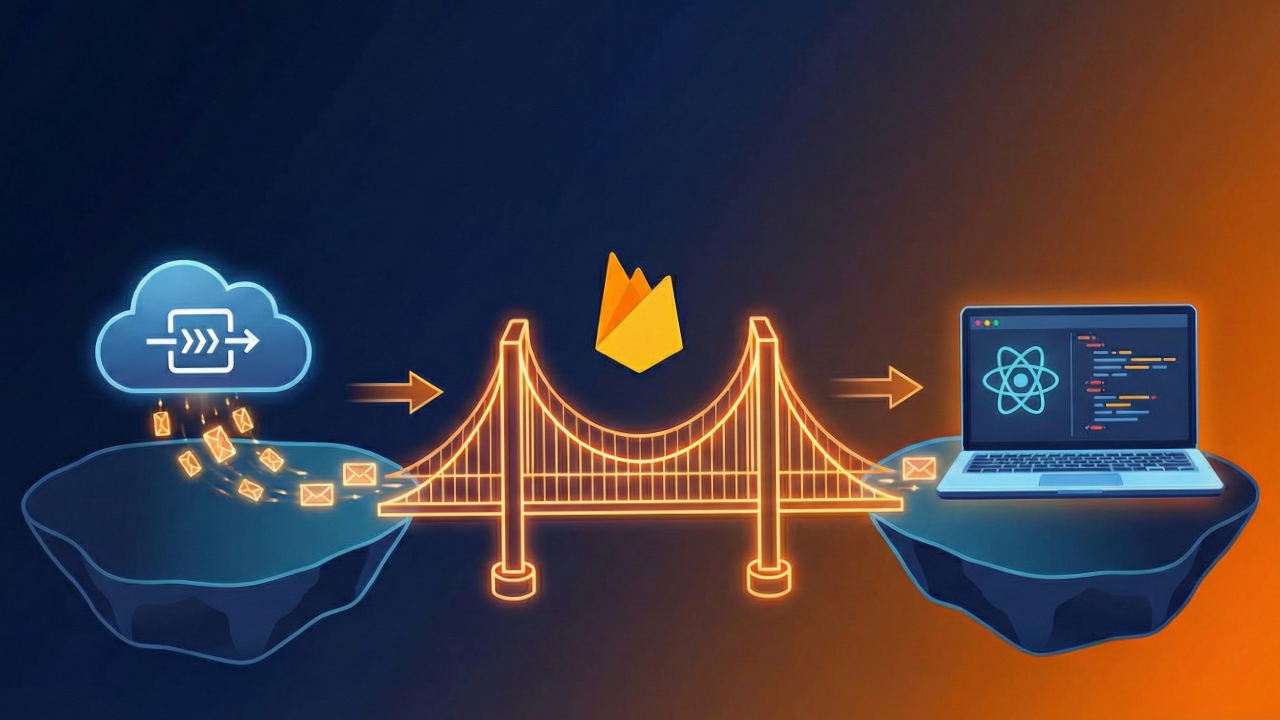
Ready to start defusing?
We thrive on our customers' successes. Let us help you succeed in a truly data-driven way.