

By: Maciek Stanasiuk, CEO & Principal Consultant at Defused Data
If you’ve worked in digital analytics I’m sure you saw it, too. You build an absolutely amazing tracking setup: with perfect solution design exactly matching business requirements and really smart applications of the involved tool stack, all implemented and tested with great care. Then, some of the people in your team leave, you move to another projects, but for some time everything seems fine. That is, until someone notices a crucial report being broken for weeks. Or, even worse, until after some time (sometimes months, most often years) no one trusts your data anymore (and, hey, trust is what matters in analytics the most, right?) and all you can do is to start one big refactoring project, basically rebuilding everything from scratch.
I do have a lot of thoughts for why is tracking (and, often, data products in general) more prone to technical debt than other aspects of digital products, but I think the root cause is simple: it’s not as business critical as other user-facing features, so that it’s often just an afterthought.
Of course, there are organizations where tracking is one of the key elements of the product itself, sometimes even being a part of the developers’ definition of done. But let’s face it: they’re a minority and will probably stay it for quite some time more.
Data quality assurance
Because of this “organizationally-imposed paradigm of low quality data sources” (I just came up with this, all rights reserved!), data analysts, engineers and architects have been doing their best to include tests and assertions as a part of their workflows, ensuring that quality expectations are met and data is trusted. There are many tools that can currently be used for that, but I think the majority of them can be grouped in three categories, each with its own pros and cons:
I think that all of the above methods have their place depending on the situation, team, organizational structure, etc. I do strongly believe, though, that the last approach is the best one - it offers the fastest insights, the most detailed specification capabilities and deep integration with developers’ workflows and complex systems.
Even when you’re not using any event streaming technologies or don’t have a CDP in place, there are still some tools on the market, allowing application of the same approaches to digital (or product) analytics. One of them is our partner from Reykjavik, Avo, who we absolutely love (hi, folks!) and can wholeheartedly recommend to any organization with more advanced use cases and looking for an all-in-one solution.
Having said that, we are huge believers in open-source software and wanted to make the entry barrier to event-level schema-based validation even lower. Enter: Events Validator!
Events Validator
Events Validator is a scalable, serverless solution for real-time JSON event validation running on Google Cloud Platform. It allows anyone to easily validate the quality of any in-app event data (e.g., coming from server-side Google Tag Manager) before it hits their analytics or marketing destinations.
It can be deployed in less than 5 minutes with Terraform and be fully operational in SST GTM setups in 10 (well, depending on how quickly your container gets published.) It comes with a validation back-end and a schema manager UI built in Streamlit.
It’s been built with unlimited extensibility in mind. Some of our ideas for features to be added in the near future are: adding support for hosting schema files in a separate Git repo, developing an automated anomaly detection mechanism with Slack notifications or creating an agent that will automatically build schemas out of your legacy documentation - no matter whether it’s a spreadsheet, a PDF or a Confluence page. The repo is also fully ready for agentic development.
And the best part? We’re releasing it with the most permissive GPL-3.0 license, so that you can do whatever you want with it, however you want. The digital analytics community has always been great for us and this is our way to at least partially pay it back.
Architecture
The architecture is kept to be as simple as possible, but without taking unnecessary security risks:
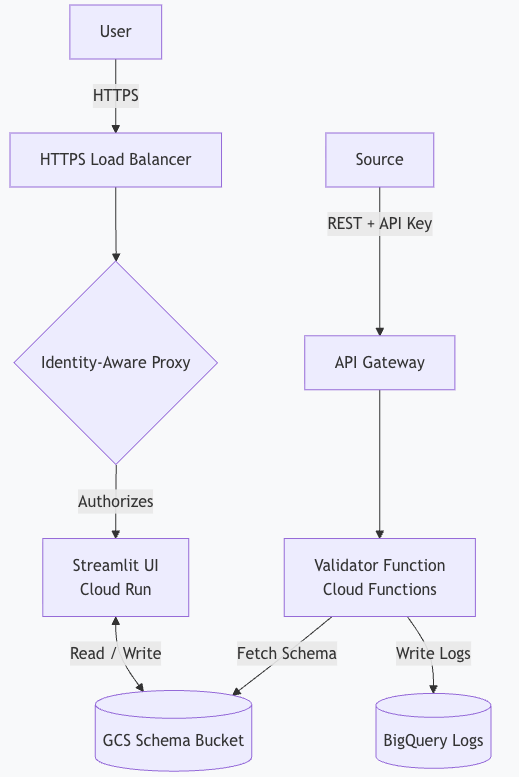
The back-end part consists of:
- A Google Cloud Storage bucket containing the schema files,
- A Cloud Run Function checking incoming requests against the schemas with an API Gateway configuration restricting access to them,
- A BigQuery table storing the results of the checks.
Schema files can naturally be created and modified in any text editor or IDE. To easily visualize dependencies between them, though, we built a small front-end for it using Streamlit. It can be either run locally using uv or deployed on Cloud Run (with Google’s Identity-Aware Proxy to restrict access), eg. to make it available for the entire team.
Data Sources
Technically, the function can take on any POST request as long as it includes the event data in its body. The most obvious use case is of course setting it up with a (preferably server-side) Google Tag Manager container - we’re doing it now, too.
The easiest way to get started here is to use stape.io’s “JSON HTTP Request“ tag and use your API Gateway’s endpoint.
Please always remember to run tests only on sampled data (eg. set up a trigger to only run on 1% of the events you want to test). If there’s something wrong with your tracking setup, it will still be more than enough to catch the issue, but will ensure you won’t overpay for the cloud. In our tests, the approximate cost of Cloud Run and BQ streaming was at around $0.50 per day for 50,000 processed events, but your mileage might of course vary. Always set proper project-level budgets and warnings if you’re unsure of the costs!
Schemas
The currently used schema files are a simplified version of JSON schemas, following the basic format of:
{
  "parameter_name": {
    "validation_type_1": "validation_rule_1",
    "validation_type_2": "validation_rule_2"
  },
  ...
}
For example:
{
  "event_name":        { "type": "string", "value": "purchase" },
  "event_id":          { "type": "string" },
  "event_type":        { "type": "string", "value": "interaction" },
  "primary_category":  { "type": "string", "value": "ecommerce" },
  "transaction_id":    { "type": "string" },
  "value":             { "type": "number" },
  "tax":               { "type": "number" },
  "shipping":          { "type": "number" },
  "currency":          { "type": "string" },
  "coupon":            { "type": "string" },
  "items": {
    "type": "array",
    "nestedSchema": {
      "item_tags":      { "type": "string" },
      "item_id":        { "type": "string" },
      "ticket_pool_id": { "regex": "^[0-9]+$" },
      "item_name":      { "type": "string" },
      "currency":       { "regex": "^[A-Z]{3}$" },
      "index":          { "type": "number", "optional": true },
      "item_list_id":   { "type": "string", "optional": true },
      "item_list_name": { "type": "string", "optional": true },
      "discount":       { "type": "number" },
      "coupon":         { "type": "string", "optional": true },
      "item_brand":     { "type": "string" },
      "item_category":  { "type": "string" },
      "item_category2": { "type": "string" },
      "item_category3": { "type": "string", "optional": true },
      "item_category4": { "type": "string" },
      "item_category5": { "regex": "^(ab|cd|ef|gh)$"},
      "item_variant":   { "regex": "\\S" },
      "price":          { "type": "number" },
      "quantity":       { "type": "number" }
    }
  }
At the launch, the supported validations are:
- Type: checks if the parameter exists and is a string, a number, etc.
- Value: checks if the value matches a pre-defined fixed value.
- Regex: checks if the value matches a regex.
Adding a new validation only requires adaptation of the Cloud Function, so it’d be great to add support for cross-parameter context (using an example already mentioned above - to be able to handle cases where ecommerce item IDs using different patterns based on the categories they are in) or handling datetime formatting on the fly.
For an always up to date list of supported validations, please refer to our GitHub documentation.
BigQuery
The results of each field’s validation is added to a single table, with one raw per one test result in the following schema:
event_id- generated in the Cloud Function (stable ID for the event).field- the parameter/key we validated (e.g.,currency,value,user_id).error_type- the category of failure.expected- what the rule expected (e.g.,"number", or a pattern).actual- the value we observed (orNULLif missing).timestamp- time of entry into the Cloud Function (also our partition key).status-validorinvalid.event_name- GA-style name (or any custom event name).event_data- the event stored as a stringified JSON. It helps with setup debugging, but bloats the data volume, so feel free to remove it from the validator function if your tests are deployed on production and you know what you’re expecting.value- optional helper field for business-critical values when quick filtering is handy.
This allows for an easy and quick event parameter-level validation - scroll below to the “Use Cases” section for a little showcase on how we’re using Event Validator already.
UI
To allow for easy management of schemas and parameters, we built a small front-end UI for the app with Streamlit.

The Explorer tab allows you to see all the schemas in your bucket and all their parameters in a single view:

From there, you can on, you can enter the Builder, where you can modify the schema with adding/removing new params and their expected validations.

Before doing so, you need to have your Params Repo in place. When initializing a new project, you should by default have access to all the default GA4 params, but you can also add whatever you’d like. Once added, the parameter will be available for schemas to use.
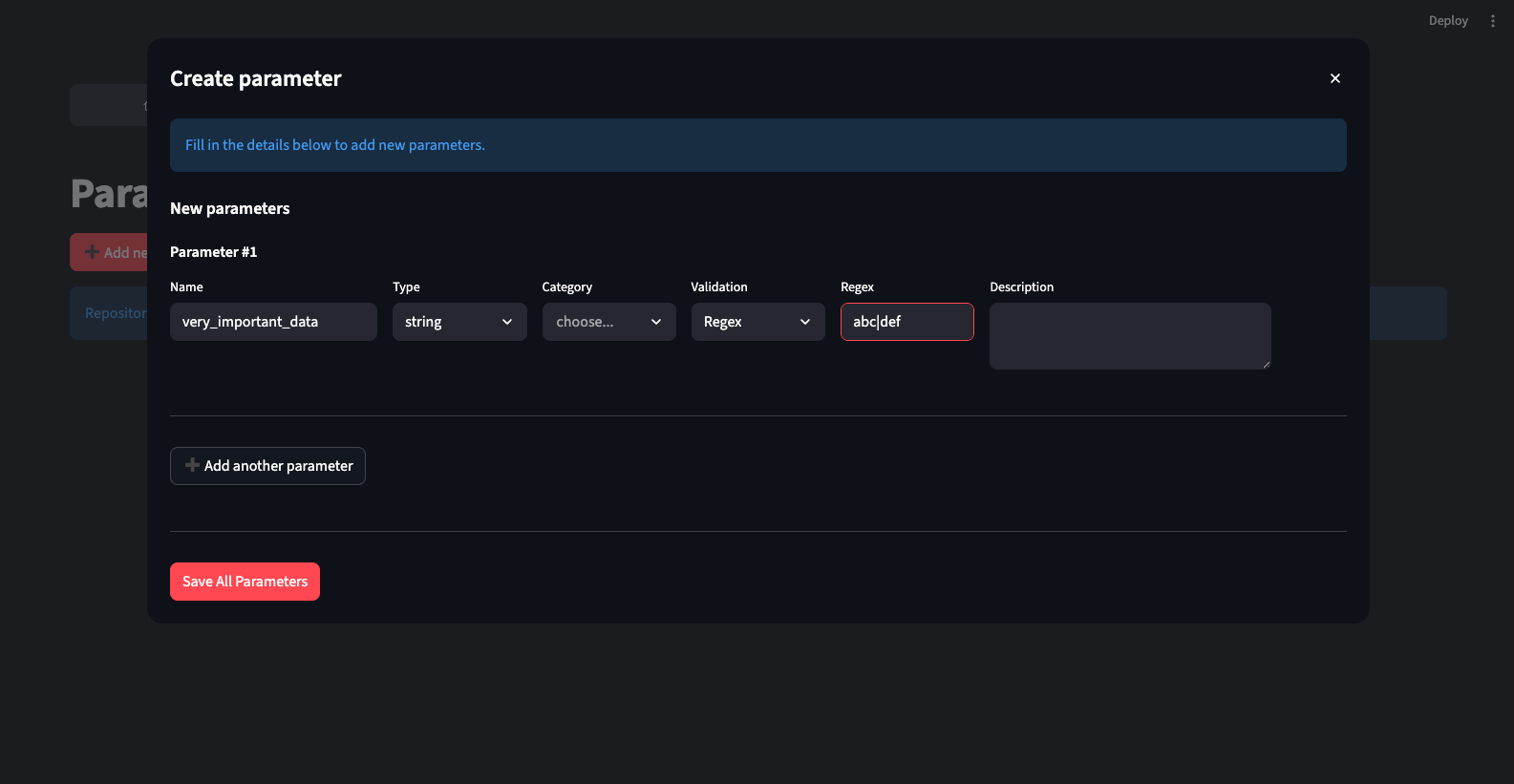
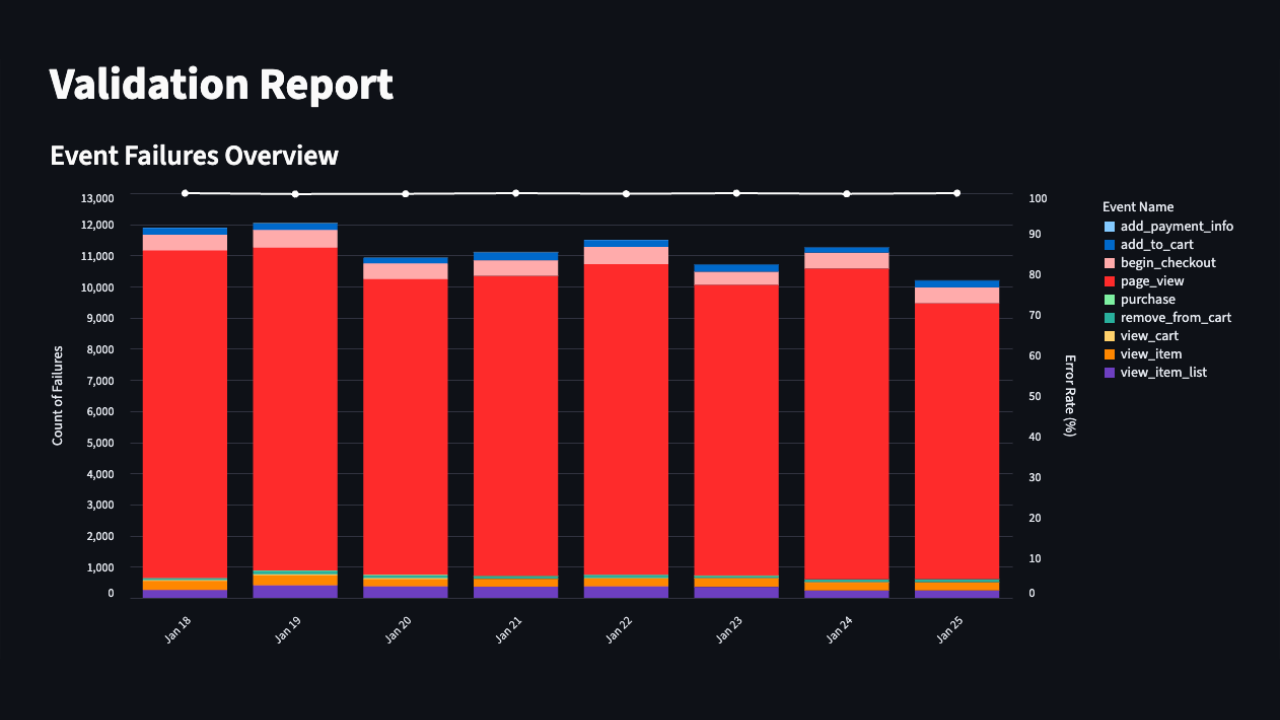
The Export tab allows you to export the schema into a PDF to eg. share it with your development team. Lastly, the Validation Report is the first draft of a report showing the issues found by the tool.
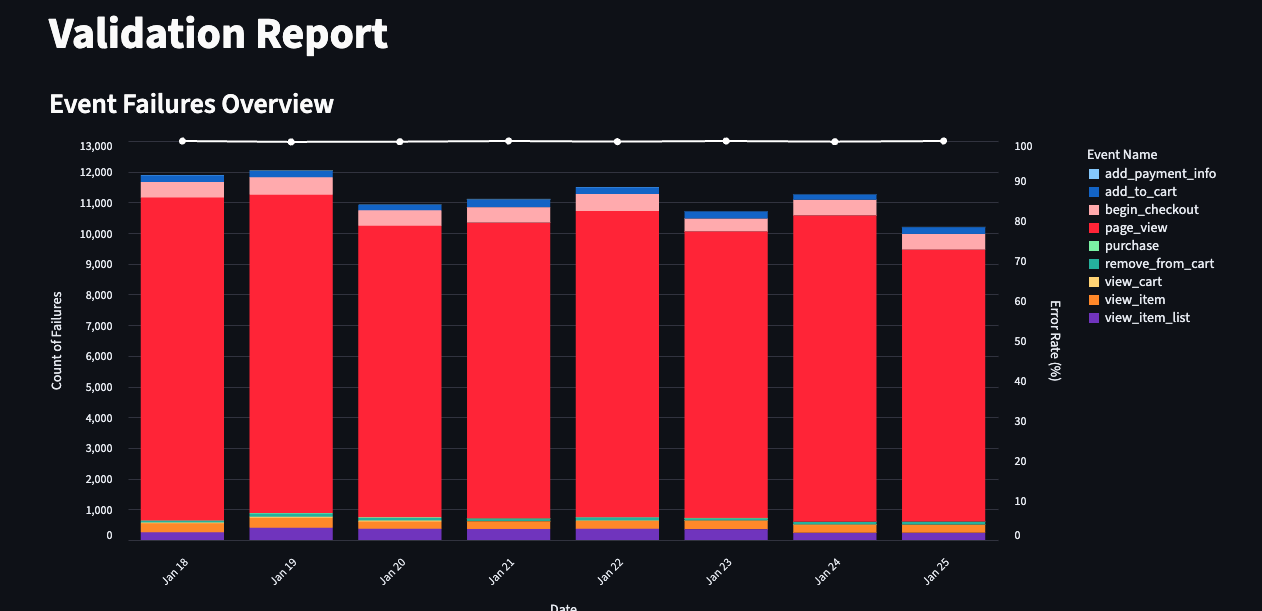
Of course, as the raw validation data lands in BigQuery, you can also aggregate and visualize it with whatever tools you use. We’ll be sharing a Looker Studio template, too, for those preferring it over Streamlit.
Use Cases
Naturally, the most basic use case is to be able to analyze and surface the quality issues with your tracking setup - for now, manually. We’ve been doing it ourselves and got one cool example to share with you.
Looking at seven days of one client’s production data, we saw roughly 2,300 distinct events. About 38% of them contained at least one validation error.
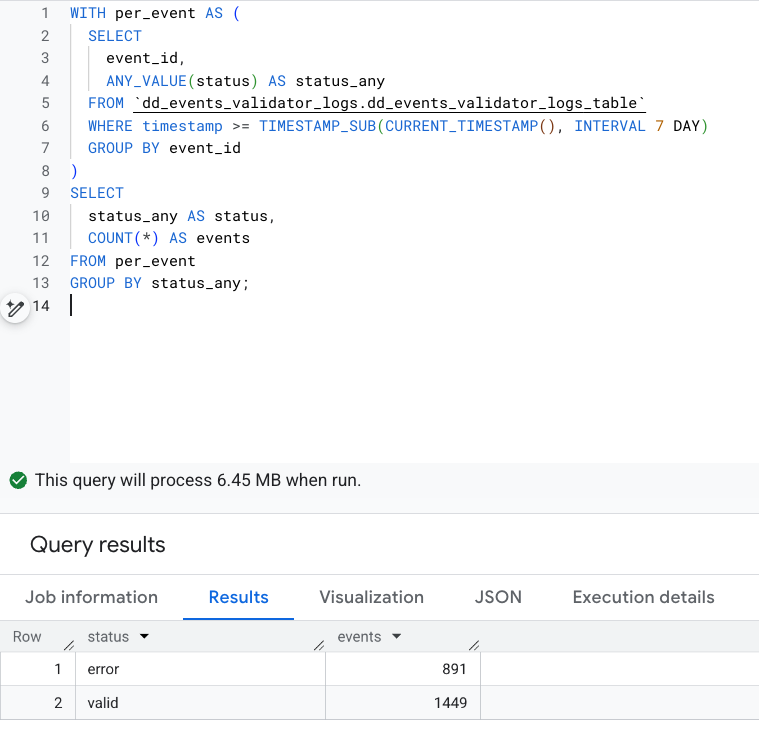
Certain events stood out immediately. purchase, add_to_cart, and remove_from_cart had the highest error ratios:
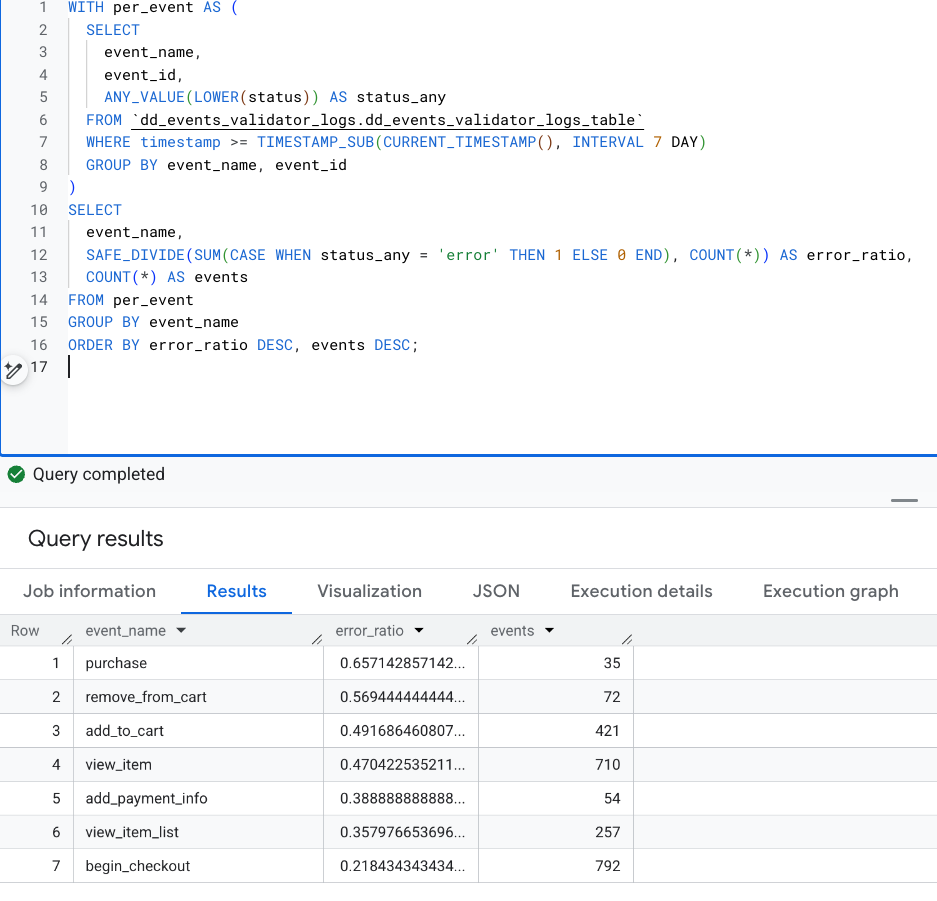
Looking more in-depth showed that some fields were present, but included wrong values and, in some specific scenarios, items data were entirely missing. Finding them manually would’ve taken ages!
As the next step we’ll add automated anomaly detection, most likely built directly in BigQuery with Dataform. Then, results could be automatically posted on Slack or Teams - reducing the time to surface any issues from days or, sometimes, weeks, to hours.
Summary
I really hope that you’ll find Events Validator useful. Building it was really fun and, for us, it’s already proven its value only in a week after deploying it. It’s also really impressive how quickly we can all build such micro tools with agentic workflows these days - hopefully it’ll lead to even deeper tech democratization. If you have any questions, please feel free to contact us! And if you’d like to help us develop the Validator even further - see below!
Contributors welcome
Once again, the digital analytics community has always been the best part of the job. To give you all something back, Events Validator will always stay open-source and free, with the most permissive licenses imaginable.
There are a lot of things that can make it better, though. Some of our ideas were already mentioned above and we’d love to hear yours. Got any? Simply open a new Issue and we’ll take a look at it. Our up-to-date roadmap is always available on GitHub, too.
Building it all ourselves will be difficult and we’d love your support. If you’d like to help, simply add a new feature or fix branch in the project’s repository and create a pull request. We’ll then review it and, if possible, merge it. Alternatively, if you have some bigger ideas yourself, believe in the project and have some spare time, we’d be more than happy to have you become a core member of the maintaining team. If that sounds interesting, send us a quick email at opensource@defuseddata.com and we’ll get back to you as soon as possible!

What’s new at Defused Data
Embrace a future filled with innovation, technology, and creativity by diving into our newest blog posts!
View all
Ready to start defusing?
We thrive on our customers' successes. Let us help you succeed in a truly data-driven way.